
Floating usage widget/11
Stay in your flow. Keep usage in sight.
Check usage, quota status, and reset countdowns in a compact floating widget or an expanded glass panel.
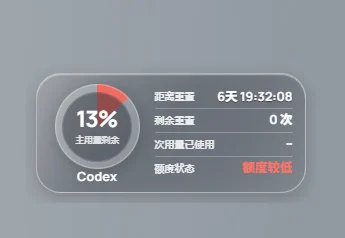
For desktop users working across editors and applications who want a quick view of model usage.
01 / Floating usage widget
Keep the key status in view
The optional floating widget reduces trips back to the main window while you focus on a task.
- Check usage and quota status.
- See reset countdowns.
- Enable always-on-top display when useful.
02 / Floating usage widget
Choose compact or expanded
Use the small circular widget when space is limited, or the expanded glass panel for a richer overview.
- Use the compact circular style.
- Switch to the information panel.
- Fit the widget into your desktop layout.
03 / Floating usage widget
Use it when you need it
Enable the widget in settings and turn it off when it is unnecessary. Open account management or analytics for deeper inspection.
- Control visibility in settings.
- Combine it with account refreshes.
- Move to full analytics for historical detail.
Getting started
- Enable the floating widget in settings.
- Choose a style, position, and always-on-top preference.
- Open account management or analytics for further detail.
The widget displays information available to the app. Updates depend on refreshes and recorded requests; it does not add quota.
A few useful answers
Can I turn the widget off?
Yes. It is optional and can be disabled in settings.
How does it differ from Token analytics?
The widget offers an at-a-glance status. Analytics shows recorded usage trends and category breakdowns.